


UNIX Unleashed, Internet Edition
- 21 -
Introducing HyperText Transfer Protocol (HTTP)
by James Edwards
Without a doubt, the explosive growth of the Internet has been driven by the enormous popularity of the World Wide Web (the Web). The Web's continuing success is attributable to the simplicity with which it provides users an ability to locate and retrieve dispersed information from within the Internet. A major part of this success is due to the effectiveness of the hypertext transfer protocol (HTTP).
HTTP is an application protocol that provides a mechanism for moving information between Web servers and clients (known as browsers). To be clear, HTTP is not a communication protocol; HTTP is an application. HTTP functions much like the other standard UNIX-based applications, such as Telnet, ftp, and SMTP. Like these applications HTTP makes use of its own well-known port address and the services of underlying reliable communication protocols, such as TCP/IP.
This chapter details how the HTTP application operates. This will be done through examination of the protocols message formats and return codes, but also through examples that offer a step-by-step examination of how the protocol functions.
This chapter highlights a number of performance problems attributable to the operation of HTTP. I will attempt to provide insight as to the how and why of these problems; as well as to indicate how re-configuration of certain server parameters may help to alleviate some situations.
What HTTP Does
The Internet is a huge mass of information. The development of the Web was driven by a desire for a simple and effective method of searching through this wealth of information for particular ideas or interests.
Within the Web, information is stored in such a way that it can be referenced through the use of a standard address format called a Uniform Resource Locator (URL). Each URL points to a data object such that it has an uniquely identifiable location within the Internet.
In addition, through the use of a standard data representation format known as Hypertext Markup Language (HTML), it becomes possible to include URLs along side actual data. These URLs can then provide reference to other related information located either on the same or remote Web server. Users are then able to creating their own discreet and distinct paths through the Web, using URLs to help them maneuver.
Users access the Web through a client application called a browser. This is a special program that can interpret both the format information, such as font size and colors, as well as the URLs that are embedded within the HTML documents. The HTTP application provides the final piece in the puzzle; it provides a simple and effective method of transferring identified data objects between the Web server and the client.
NOTE: Until the advent of the Web, the traditional method for moving files around the Internet was the ftp application.Why wouldn't this program be effective for transfers within the Web? Well, the performance overhead involved in using the ftp program would be too great. This is because ftp requires the use of a separate control connection for the file download request. After the download request has been made, the server would initiate the setup of another connection over which the selected file could be downloaded. HTTP provides a streamlining of this process through the use of a single connection that is used for both the file request and the data transfer components.
Later in this chapter we outline in some detail the defined HTTP message types and protocol header formats. By way of an introduction to that section, a useful first step will be to examine the logical operation of HTTP and its interaction with the other components parts found within the Web.
Figure 21.1 outlines how the HTTP application protocol relates to both the Web server and client programs. As indicated, the browser has been designed to interpret format information contained within HTML pages. It is possible for an HTML page to also contain URLs as references to other pages located elsewhere on the Internet. These links are referred to as hyperlinks and are often colored or underlined within the HTML pages.
Figure 21.1.
Logical organization of the Web.
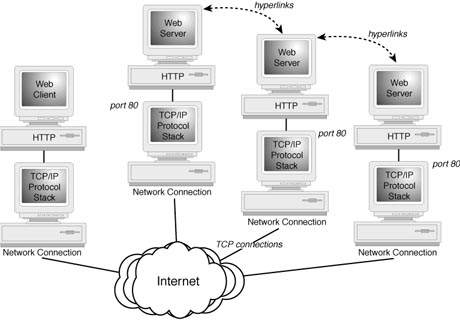
The main function of the HTTP application is to request the pages referenced by these hyperlinks. This is accomplished through the following steps:
- 1. When a browser is pointed at a Web server, HTTP will initiate
the setup of a TCP connection between the client and port 80 on the indicated server--being
the well-known port number reserved for the HTTP server process.
2. After this TCP connection has been established, the selected HTML document will be transferred over this connection to be displayed by the client.
3. The server will automatically terminate the TCP connection immediately after the HTML document has been transferred to the client.
NOTE: The TCP connection will be terminated even if the client wishes to transfer more HTML pages from the same server within the same session. Each new request requires that another TCP connection is established. This method of operation raises some grave performance concerns, which are covered later in this chapter.
One noted strength of HTML is that additional references to content can be encoded within each document. As indicated earlier, these could be pointers to content that could be located either on the same Web server, or alternatively on a different Web server.
In addition to hyperlinks, HTML pages may often contain other information objects--particularly graphics. As the browser encounter references for embedded information it will ask HTTP to request the download these files. HTTP will initiate a separate TCP connection for each file that needs to be downloaded. Some HTML pages may contain a number data object, and to help speed up the overall download process some browsers will allow multiple TCP connection to be initiated simultaneously.
NOTE: The Netscape Navigator browser allows the user to specify any number of possible simultaneous tcp connections. It is possible to notice some slight performance improvements by incrementally increasing the maximum number of connections; however, any improvement gains appear to flatten out after four connections. This is caused by the fact that the browser sets a hardcoded maximum of four concurrent connections even though it is possible for the client to request more.
Protocol Definition
The HTTP application uses a version numbering scheme consisting of a major and a minor number. These numbers are arranged using the following format:
<Major Version> . <Minor Version>
NOTE: The intention is to highlight changes within the HTTP base messaging system with changes to the major version number. In contrast, a change in the minor version number indicates the addition of features and functionality to the protocol.
Current HTTP implementations are based upon the design specifications that have been outlined within the Request for Comments (RFC) 1945. These implementations are classified as HTTP version 1.0 (represented as HTTP/1.1). RFC 1945 is known as an informational RFC, as such it does not represent a validated application standard. This has resulted in a number of HTTP implementations from different vendors exhibiting some degree of variation in available functionality.
A first draft of an updated version of the HTTP, termed version 1.1. (or HTTP/1.1), has been completed. The details of this upgraded specification have been published within the RFC 2068.
The indicated changes contained within RFC 2068, classify as minor upgrades of the HTTP application. However, of greater significance is that HTTP/1.1 is being developed for ratification as an Internet Engineering Task Force (IETF) Standard. The objective being to set clear guidelines for the development of a common HTTP implementations in addition to providing some areas of enhanced functionality.
So far we have only provided an overview of the general operation of the HTTP application by describing, at a somewhat high level, how HTML pages are transferred within the Web. The following section will extend this discussion by investigating the syntax of the HTTP application through the use of a real-world example.
In addition to the example, an examination of available protocol messages, header fields, and return codes is undertaken, with summary tables provided for additional reference.
HTTP Example Operation
A more detailed study of the operation of HTTP can be made through an examination of the output from a standard packet analyzer. Table 21.1 provides an example of this operation through the use of trace data taken from a Linux server running the tcpdump application.
The tcpdump application operates by placing the Ethernet card in a promiscuous mode, such that it can see and record each packet on the network. HTTP session information can then be collected by pointing a Web browser at an HTML page maintained on a local Web server. In order to simplify examination of the recorded session, I have made some minor adjustments to the recorded tcpdump output. These modifications consist of rearranging the presented order of some recorded packets as well as removing some superfluous detail.
Table 21.1. Packet trace data illustrating HTTP operation.
| The Web client initiates a connection to the Web server. | |||||
| 1 | client.22248 | > | server.80 | S | 1427079:1427079(0) win 4096 |
| 2 | server.80 | > | client.22248 | S | 32179213:32179213(0) |
| ack 1427079 win 4096 | |||||
| 3 | client.22248 | > | server.80 | ack 1 win 4096 | |
| The client sends an HTTP request message to the Web server--requesting an HTML page. | |||||
| 4 | client.22248 | > | server.80 | 1:537(536) ack 1 | |
| 5 | server.80 | > | client.22248 | ack 537 | |
| 6 | client.22248 | > | server.80 | 537:1073(536) | |
| 7 | client.22248 | > | server.80 | P | 1073:1515(536) |
| The Web server sends back the requested page and status information. | |||||
| 8 | server.80 | > | client.22248 | 1:537(536) ack 1516 | |
| 9 | server.80 | > | client.22248 | 537:1073(536) ack 1516 | |
| 10 | server.80 | > | client.22248 | 1073:1609(536) ack 1516 | |
| 11 | client.22248 | > | server.80 | ack 1609 | |
| 12 | server.80 | > | client.22248 | 1609:2145(536) ack 1516 | |
| 13 | server.80 | > | client.22248 | 2145:2681(536) ack 1516 | |
| 14 | server.80 | > | client.22248 | 2681:3217(536) ack 1516 | |
| The requested page contains an embedded graphic. To transport this a second TCP connection is established. | |||||
| 15 | client.22249 | > | server.80 | S | 21200132: 21200132(0) win 4096 |
| 16 | server.80 | > | client.22249 | S | 13420003: 13420003(0) |
| ack 21200132 win 4096 | |||||
| 17 | client.22249 | > | server.80 | ack 1 win 4096 | |
| The client passes a requested to download the graphic to the Web server. | |||||
| 18 | client.22249 | > | server.80 | 1:537(536) ack 1 | |
| 19 | server.80 | > | client.22249 | ack 537 | |
| 20 | client.22249 | > | server.80 | 537:1073(536) ack 537 | |
| The Web server responses sends the graphic to the client | |||||
| 21 | server.80 | > | client.22249 | 1:537(536) ack 537 | |
| 22 | server.80 | > | client.22249 | 537:1073(536) ack 537 | |
| The server completes sending the graphic and closes the TCP connection. | |||||
| 23 | server.80 | > | client.22249 | F | 1073:1395(322) ack 537 |
| 24 | client.22249 | > | server.80 | ack 1396 | |
| 25 | client.22249 | > | server.80 | F | 537:537(0) ack 1395 |
| 26 | server.80 | > | client.22249 | ack 538 | |
| The server completes sending the original HTML page and closes the first TCP connection. | |||||
| 27 | server.80 | > | client.22248 | F | 3217:3438(221) ack 1516 |
| 28 | client.22248 | > | server.80 | ack 3439 | |
| 29 | client.22248 | > | server.80 | F | 1516:1516(0) ack 3439 |
| 30 | server.80 | > | client.22248 | ack 1517 | |
This table provides an example of a Web browser requesting an information page from a Web server.
Remember that HTTP functions as an application that operates above a reliable communication services provided by TCP/IP. To this end, the initial connectivity between client and server involves the setup of a TCP connection between the hosts.
The establishment of a TCP connection is accomplished through the completion of something known as the three-way handshake. This process is illustrated within the example. The client sends a TCP packet to the server, requesting a new TCP connection by setting the SYN option flag and supplying an initial sequence number (ISN). The server responds, by sending an acknowledgment (ack) back to the client along with its own ISN for this connection, which it highlights by also setting the SYN flag. The client responds, with the final part of the three-way exchange, by acknowledging the server's response and ISN.
Following the three-way handshake, the TCP connection is opened and ready for data transfer. This begins with the client sending an HTTP request message to retrieve an indicated HTML page (packets four through seven in the example). The server responds with an HTTP response message that contains the requested HTML page as the message body. This data is transferred over the TCP connection with the client sending acknowledgment packets back to the server as required.
While this HTML page is being transferred, a reference to an embedded object is encountered. The HTTP application on the server will automatically transfer this object to the client over a separately established TCP connection. In the table, packets 15, 16, and 17 illustrate the establishment of another TCP connection, which again involves the outlined three-way handshake. The client now has two active TCP connections with the Web server.
NOTE: In the example, the packets relating to each connection will be intermingled and not be neatly separated as the table illustrates. The session trace output was rearranged to clarify the overall operation of the Web session.
After the server has completed the transfer of each data item, it automatically closes the corresponding TCP connection. This process involves the transfer of four additional packets. First, the server will send a TCP packet with the FIN option flag set, indicating that it wishes to close its end of the active connection. This packet is acknowledged by the client, which in turn closes its end of the connection by sending a similar packet to the server. The server sends an acknowledgment, and the connection is closed. The table illustrates how both separate TCP connections are independently terminated following the completion of data transfer.
It should be noted that the establishment and termination of each TCP connection involves the exchange of a minimum of seven packets. This can represent a significant amount of protocol overhead.
Messages, Headers, and Return Codes
HTTP messaging is formatted using standard ASCII requests that are terminated by a carriage return and a line feed. The HTTP application makes use of two defined messages types: message requests and message responses.
Requests are made from Web clients to Web servers, and are used to request either the retrieval of data objects (such as HTML pages) or to return information to the server (such as a completed electronic form).
The Web server uses response messages to deliver requested data to the client. Each response contains a status line that indicates some detail about the client request. This might be an indication that an error occurred or simply that the request was successful.
Both request and response messages can be accompanied by one or more message headers. These headers allow the client or server to pass additional information along with its message. Before investigating the use of available headers fields, we consider the operation of the standard message formats.
HTTP Request Messages
The Listing 21.1 provides an outline of the general format for making HTTP data requests.
Listing 21.1. HTTP data request syntax.
Request method
headers
<blank line> (Carriage Return /Line Feed)
message body
NOTE: Older versions of HTTP, such as version 0.9, only allow for what the standard refers to as `simple' request and response formats. What this means is that the HTTP request messages are not able to include any header information. The use and availability of headers is summarized in Table 21.3 below.
Request Methods
The general syntax for a request methods is as follows:
<request method> <requested-URL> <HTTP-Version>
HTTP version 1.0 defines three request methods: GET, POST, and HEAD. Table 21.2 summarizes the functions of each support method and outlines a specific example.
Table 21.2. Request method syntax and examples.
| Request | Description |
| GET | Used to retrieve object identified within the URI. The use of defined headers can
make the retrieval conditional. Example: GET HTTP://www.dttus.com/home.html HTTP/1.0 Result: The Web server will return the identified HTML page to the client. |
| POST | Used to request that the destination Web server accept the enclosed message body;
this is generally used for returning completed electronic forms or for posting electronic
news or e-mail messages. Example: POST HTTP://www.dttus.com/survey/completed.HTML HTTP/1.0 From: jamedwards@dttus.com Result: message body placed here |
| HEAD | This method is identical to GET except that the Web server does not return an enclosed
message body--only the relating header information. This method is often used to
test validity, accessibility, or for any recent changes. Example: HEAD HTTP://www.dttus.com/home.html HTTP/1.0 Result: The Web server will return a result code to the client. |
NOTE: A Uniform Resource Identifier (URI) is a generic reference that HTTP uses to identify any resource. The resource could be identified through its location, by using a Uniform Resource Location (URL), or by a name, using a Uniform Resource Name (URN).
Defined Header Values
Header values are used to relay additional information about an HTTP message. A single HTTP message may have multiple headers associated with it.
Generally, it is possible to separate headers into the following four distinct groups:
- Those that relate to message requests
- Those that relate to responses
- Those that relate to the message content
- Those that can be applied to both message requests and message responses
The operation and use of message headers can best be seen through the following simple example:
GET HTTP://www.dttus.com/home.html  HTTP/1.0    - GET request
If-Modified-Since: Sun, 16 Mar 1997 01:43:31 GMT - Conditional Header
                                                - CR/line feed
In this example, a Web client has forwarded an HTTP request to a Web server asking to retrieve a specified HTML page. This accomplished using the GET request method. This HTTP request has been supplemented with a single header field. This header asks that a conditional test be performed, asking that the indicated HTML page only be returned if it has been modified since the indicated date.
The following tables provide a summary of the defined header values for each of the four groups. Note that within each grouping a large number of the headers are only available within the pending HTTP version 1.1 specification (they have been included for completeness).
General header values are applicable to both request and response messages, but are independent of the message body. The following table summarizes the available values providing a short description of the related function.
Table 21.3. Defined general header values.
| Header Name | Header Description | HTTP/1.1 Only |
| Cache-Control | Provides standard control for caching algorithms | X |
| Connection | Forces a close on a persistent connection | X |
| Date | Specifies data and time field | |
| Pragma | Specifies the use of a cache (HTTP/1.0 specific) | |
| Transfer-Encoding | Specifies whether any transformation has been applied to the message | X |
| Upgrade | Allows a client to signal a request to use an upgraded version of a protocol | X |
| Via | Used with trace method to determine paths | X |
Some available header values relate specifically to client browser request messages--either GET, POST, or HEAD methods (also applicable to the new request methods introduced within HTTP/1.1). Table 21.4 provides a summary of the headers applicable to request messages.
Table 21.4. Defined request header values.
| Header Name | Header Description | HTTP/1.1 Only |
| Accept | Indicates data formats acceptable for responses | X |
| Accept-Charset | Indicates what character sets are acceptable | X |
| Accept-Coding | Indicates what encoding schemes are acceptable | X |
| Accept-Language | Indicates what languages are acceptable | X |
| Authorization | Contains user credentials for authentication | |
| From | E-mail address of client | |
| Host | Host name and port of the requested resource | X |
| If-Modified-Since | Conditional GET request | |
| If-Match | Conditional GET request | X |
| If-None-Match | Conditional GET request | X |
| If-Range | Conditional GET request | X |
| If-Unmodified-Since | Conditional GET request | X |
| Max-Forwards | Used with TRACE to limit loop testing ranges | X |
| Proxy-Authorization | Credentials for next proxy in service chain only | X |
| Range | GET on a range of bytes within message body | X |
| Referer [sic] | Address of URL where object was obtained | |
| User-Agent | Details user agent making the request |
Web server generated responses to client requests may be supplement to a number of optional header values. Table 21.5 provides a summary of those header values specifically relating to response messages.
Table 21.5. Defined response header values.
| Header Name | Header Description | HTTP/1.1 Only |
| Age | Indication of the "freshness" of a cached entry | X |
| Location | Allows redirection of a location | |
| Proxy-Authenticate | Provides authentication challenge for browser | |
| Public | Lists capabilities and supported methods of server | X |
| Retry-After | Used with 503 status to indicate a duration | X |
| Server | Indicates software product and version on server | |
| Vary | Listing of the selected option in request message | X |
| Warning | Arbitrary information relayed to user | X |
| WWW-Authenticate | Used with 401 status, contains challenge | X |
Message body headers define optional meta-information about the data object, or, if a data object is not present, about the resource identified within the request. Table 21.6 outlines the available header values.
Table 21.6. Defined message body header values.
| Header Name | Header Description | HTTP/1.1 Only |
| Allow | Lists the set of supported methods with that object | |
| Content-Base | The base for resolving any specified relative URI's | X |
| Content-Encoding | Indicates what coding has occurred--use of zip files | |
| Content-Language | Natural language of specified object | X |
| Content-Length | Size of transferred message body | |
| Content-Location | URL of provided message | X |
| Content-MD5 | MD-5 integrity check | X |
| Content-Range | Partial message body references | X |
| Content-Type | Media type of message sent | |
| Etag | Entity tag for object | Xcomparisons |
| Expires | The stale date | |
| Last-Modified | Date and time of last modification |
Response Messages
The general syntax for a Web servers response message is as follows:
Status Line
headers
<blank line> (CR/LF)
message body
The first line of the Web server response consists of something known as the status line. This is a general syntax for this information is:
<HTTP-Version> <Status-Code> <Status Code Description>
Table 21.7 provides a complete listing of the defined status codes and their corresponding descriptions. As with HTTP requests it is possible to include one or more headers within Web servers responses. Listing 21.2 outlines an example of how this might occur.
Table 21.7. HTTP response message status line descriptions.
| Status Line | Response Description | HTTP/1.1 Only |
| 1xx | Informational | X |
| 100 | Continue--interim server response, client should continue sending | X |
| 101 | Switching Protocol--ability to switch between older and new HTTP versions | X |
| 2xx | Success--action was received and understood | |
| 200 | Okay--the request message was successful | |
| 201 | Created--the POST request was successful | |
| 202 | Accepted | |
| 204 | No Content | |
| 205 | Reset Content--reset client view that cause request to be sent | X |
| 206 | Partial Content--server completed a part of the GET request | X |
| 3xx | Redirection--further action required to complete request | |
| 301 | Object moved permanently | |
| 302 | Object moved temporarily | |
| 304 | Object not modified | X |
| 305 | Use proxy--the client request must be via the indicated proxy | X |
| 4xx | Client error--the request cannot be fulfilled | |
| 400 | Bad request | |
| 401 | Unauthorized, authentication issue | |
| 403 | Forbidden, request not allowed | |
| 404 | Not found | |
| 405 | Method is not allowed | X |
| 406 | Request is not acceptable | X |
| 407 | Proxy authentication required | X |
| 408 | Request time-out | X |
| 409 | Conflict | X |
| 410 | Gone--and no forwarding address is known | X |
| 411 | Length required | X |
| 412 | Precondition failed | X |
| 413 | Request entity too large | X |
| 414 | Request-URI too large | X |
| 415 | Unsupported media type | X |
| 5xx | Server error--the server failed to fulfill a valid request | |
| 500 | Internal server error | |
| 501 | Not implemented | |
| 502 | Bad gateway | |
| 503 | The service is unavailable |
Listing 21.2. Using Web server response headers.
workstation> telnet www.dttus.com 80
trying 207.134.34.23
Connected to 207.134.34.23
Escape character is [^
GET /pub/images/dttus/mapimage.gif            request line entered
                                              request terminated
                                              by CR/LF
HTTP/1.0 200 OK                               response starts with
                                              Status Line
Date: Friday, 14-Feb-97 22:23:11 EST          header details
                                              are here
Content-type:  image/gif
Last-Modified: Thursday, 13-Mar-97 17:17:22 EST
Content-length: 5568
                                              headers terminated
                                              by CR/LF content is
                                              transferred here

Connection closed by foreign host             tcp connection is
                                              terminated after
                                              transfer is complete
workstation>
workstation>
In the preceding example, the Telnet program is used to create a TCP connection to the remote Web servers HTTP application port--port 80. After a connection has been established, an HTTP GET request is made. Listing 21.2 outlines how the requested image is returned to the Web client along with a number of header values directly after the status line. Note the established connection is automatically terminated by the Web server after the requested image has been transferred.
The previous table lists a summary of the possible status line return codes and their description values. This table includes return codes for both HTTP/1.0 as well as for the pending version upgrade--HTTP/1.1. The table provides an indication where a code is supported only within the later version--which has full backward-compatibility support.
NOTE: HTTP implementations do not have to be able to understand all existing return codes. However, they should be aware of each major code group. For example, if a Web server returned a value 412, the client must only be aware that something was wrong with its request and be able to interpret the return code as such.
Identifying and Overcoming Some Performance Problems
This section will look at some real world implementations and uses of the HTTP application. In particular, we will focus on some recognized limitations of the application and provide, where possible, some alternative configurations to help ease recognized problems.
There are there main areas within the operation of HTTP that have the potential to cause performance problems--connection establishment, connection termination, and communication protocol operation--we discuss some of the main issues of each.
Connection Establishment--The Backlog Queue
There is an upper-limit to the number of outstanding TCP connection requests a given application server process can handle. Outstanding TCP connection requests are placed upon a queue known as the backlog. This queue has a predefined limit to the number of requests it can handle at any one time. When a servers backlog queue reaches its defined limits, any new connection requests will be ignored until space on the queue becomes available.
If you have ever seen the message, "Web Site Found. Waiting for ReplyÉ", chances are that you have fallen victim to the problem of a complete backlog queue. During this time your Web browser will be resending the unanswered connection request in the hope that space on the backlog queue becomes available after a few seconds wait.
To understand why HTTP is so susceptible to this problem, it is necessary to understand why a server would have any outstanding TCP connection requests. A server process will queue a connection request for two reasons: Either it is waiting for the completion of the connection request hand-shake, or it is waiting for the server process to execute the accept() system call.
In order to establish a TCP connection, the client and the server must complete the three-way handshake. This process is initiated by the client, which sends a TCP connection request packet with the SYN flag set. The server will respond by sending a TCP packet with both the SYN and ACK flags set. The server will then wait for the client to acknowledge receipt of this packet by sending a final TCP packet acknowledging the server's response. While the server is waiting for this final response from the client the outstanding connection request will be placed in the backlog queue.
Once a TCP connection has been established, the server process will execute the accept() system call in order to remove the connection from the backlog queue. It is possible on a busy server that the execution of this system call may be delayed and the connection request remain on the queue for an extended period of time.
Generally, the server process will make the accept() call promptly and this will not cause the backlog queue to fill up. However, the required completion of the three-way handshake can and does cause the queue to fill and outstanding requests to be dropped.
Why is this a particular problem of HTTP within the Internet? Well, it is possible for a Web server to fill its backlog queue if it receives a large volume of connection requests from clients facing a particularly large round trip time. Figure 21.2 illustrates that the Web server receives a number of connection requests in a very short period of time. The server responds back to each client--placing the outstanding request upon the backlog queue.
Figure 21.2.
Filling up a Web servers backlog queue.
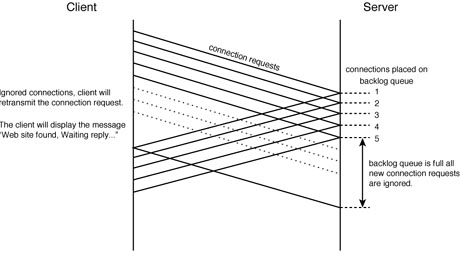
As the figure illustrates, the backlog queue fills up and there is a period of time during which the Web server will ignore any new connection request. During this time the Web client will display the "Web Site Found. Waiting for ReplyÉ" message as it attempts to successfully complete a connection request.
Default sizes of the backlog queue differ between UNIX flavors and implementations. As an example, BSD flavors of UNIX define the size of the backlog queue through the SOMAXCONN constant. Calculation of the size of the queue size is then derived using the following formula:
backlog queue size = (SOMAXCONN * 3) / 2 + 1
By default, the SOMAXCONN constant is set to a value of five--providing for a maximum of eight outstanding TCP connections to be held on the backlog queue. Other UNIX flavors or TCP/IP implementations use other parameters and parameter values to limit the size of the backlog queues. For example, Solaris 2.4 uses a default value set to five and allows this to be incremented to 32; Solaris 2.5 uses a default of 32 and allows a maximum of 1024; SGI's IRIX implementation provides default queue size of eight connections; Linux release 1.2 defaults to 10 connections; and Microsoft Windows NT 4.0 provides for a backlog maximum size of six.
For busy Web servers, system administrators should look to increasing the backlog size from the default values. Failure to do so can effectively limit the overall availability of their Web servers with the Internet.
NOTE: filling up the backlog queue for a given process has been used in a number of well-publicized denial of service attacks within the Internet. An attacker would send a Web server TCP connection requests containing spoofed source IP addresses that were unreachable. The Web server would send out its SYN and ACK packet to the spoofed address--placing the request upon the backlog queue. As the spoofed address could not be reached, the server would never receive a response, eventually timing out the request after a 75 second period.In order to deny service to the Web server, all the attacker would need to do is to send enough of these messages (10 or so) every 60 to 70 seconds. The backlog queue would then always be full and no access would be possible.
Connection Termination
The operation of HTTP on a busy server can become a major drain on available system resources. The previous section outlined how a server could potentially fill its backlog queue and prevent the creation of new TCP connections until system resources can be reassigned. In this section, we examine how a Web server could run out of available system resources as a result of how it handles the termination of established TCP connections.
The operation of the HTTP protocol causes the established TCP connections to be terminated immediately following the completed data transfer. The termination of the TCP connection is initiated by the Web server, which completes what the TCP protocol specification outline as an active close. This is done by sending the client a TCP packet with the FIN flag set. Upon receipt, the client will return an acknowledgment packet and then complete what the specification outlines as a passive close--involving sending the Web server a TCP packet with the FIN flag and awaiting a server acknowledgment.
The TCP protocol specifications allow either the client or the server to perform the active close on any connection. However, the end that performs this operation must place the connection in a state known as TIME-WAIT. This is done in order to ensure that any straggler packets can be properly handled. During the TIME-WAIT duration the connection information--stored within a structure known as a Transaction Control Block (TCB)--must be saved.
NOTE: The TIME-WAIT value is calculated to be equal to twice the maximum segment lifetime (which is why it is often referred to as the 2msl value). The segment lifetime is related to the time-to-live value of IP datagrams within the network. Waiting for the TIME-WAIT duration allows TCP to ensure connections are correctly closed--the host performing the active close needs to stick around long enough so that the other end can transmit its FINAL packet--even if some acknowledgments are lost.Normally, it will be the client end of an established TCP connection that performs the active close. The operation of the HTTP application reverses this--with the Web servers initiating the close. The net effect is that some server resources cannot be reallocated for the TIME-WAIT duration.
UNIX servers allocate a fixed number of TCBs--with values typically configurable up to a maximum of 1024. It is possible on a busy Web server for all available TCBs to become temporarily used up resulting "Web Site Found. Waiting for ReplyÉ" message being displayed to clients. The netstat program can be used to determine the number of outstanding TCBs currently in the TIME-WAIT state.
Communication Protocol Operation--TCP and Congestion Management
Some of the major criticism leveled at HTTP relate to its inefficient use of the underlying communication protocols. The TCP protocol was designed as a windowing communication protocol. Such protocols allow the receiving station to enforce a degree of flow control by providing an indication of how much data they are able to currently accept from the sender. The objective being that the receiving station can indicate to the sender how quickly it is able to process the sent data.
Importantly, the use of windowing can fail to consider the capability of the connecting network to transfer the amounts of data within the advertised window sizes. Consider a data exchange between two network hosts: The receiving station, will advertise to the sender an amount of data it is able to receive up to a maximum value. The sending station will transmit the requested amount of data, which the receive will place within its buffers. The receiving station will read data from these buffers, freeing up space for it to accept more of the senders data. The receiver will request the sender transmit a window of data sufficient to fill the available space within its receive buffers.
Such an operation will work fine--assuming that the network between the two hosts is capable of transmitting the requested volumes of data. Consider the case if the two hosts were connected a routed wide area link. If the router or the link became congested, it may not be able to process all of the data that the receiving station is advertising it can accept. The network needs to be able to indicate to the sending station to slow down its transmission! The receiving station might be advertising it is able to receive a given amount of data based on the fact that its buffers are empty, but the network in between cannot.
The slow start algorithm provides this functionality. It does this through the operation of something called the congestion window. This value is incremented based upon the number of acknowledgment packets returned from the receiving station. The sending station will transmit an amount of data, which is the minimum of either the congestion window or the window size advertised by the receiver. In such a way, the sending station can now limit its transmissions based upon both the receiving station as well as the networks capability to handle different amounts of data.
This relates to HTTP because slow start will add additional round trip delays to the transfer of data over established TCP connections. This is due to the fact that the congestion window size under the slow start algorithm is initialized to one packet--meaning that a sender will only transmit a single packet then await an acknowledgment from the receiving station. Upon receipt of each acknowledgment, the congestion window size will double in size until it matches the receivers advertised window size.
Figure 21.3 shows how this additional round trip delay will affect the transmission under HTTP. This figure contrasts the effects of the slow start algorithm against that of a long lived connection. As the diagram indicates, the long lived connection transfers the receivers maximum window size of data enabling a fast transmission time. In contrast, under the slow start algorithm, additional delays are introduced while the sender waits for the receiver's acknowledgment packets.
Figure 21.3.
Illustrating the effects of the slow start algorithm.
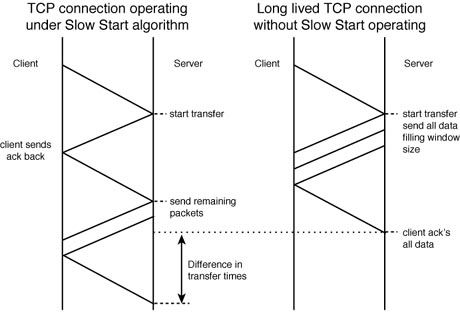
Under the TCP protocol, efficient transfers require long lived connection times, which reduce the overall impacts of the slow start algorithm. This is contrary to the operation of the HTTP application, which uses a number of ephemeral TCP connections, each of which being dedicated to transferring only a small amount of data. Each of these connections will invoke the slow start algorithm and, as such, reduce the overall efficiency of data transfers under HTTP.
Increasingly, there is a growing desire to make greater use of persistent or long lived TCP connections within the operation of HTTP. These ideas are further examined in the following section.
NOTE: This chapter relates to the operation of HTTP and not TCP. For a full and complete analysis of TCP and the use configuration of window sizes and other operating parameters refer to TCP/IP Unleashed by SAMS Publishing.
Providing Multiple Links within an HTML Page
The previous section examined the operation of the HTTP application protocol. This demonstration outlined how a Web client would make use of a separately established TCP connection to download each data object specified within a single HTML page.
As previously mentioned, the use of multiple TCP connections between the client and server will reduce the total elapse time required to transport all the data objects specified within the page. However, there is a price to be paid.
Each TCP connection requires the additional use of Web server resources, and it is very possible for servers to have difficulty in keeping pace with these requirements. This section outlines some simple HTML page design principles that will help to combat these effects and allow for more efficient use of resources.
Figure 21.4 and figure 21.5 provide a comparison of two different Web pages. Figure 21.4 makes use of a number of individual icons to outline its contents. Each icon provides a reference to a URL guiding the user through the site. This approach is in contrast to that contained in figure 21.5. The web page in figure 21.5 uses a single graphic with URLs embedded behind different parts of the graphic to provide a map of the site.
Figure 21.4.
Comparing map and icon HTML designs--Poor design.
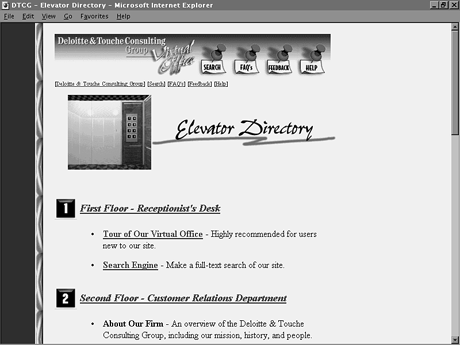
Figure 21.5.
Comparing map and icon HTML designs--Good design.

From the Web client's perspective, it is possible not even to notice a difference in download time between each of the pages. This is especially true if the browser has been configured to operate multiple simultaneous TCP connections. Even though the Web page on the right contains a number of individual graphic images, each of those images could be downloaded simultaneously.
The main issues relate to the effective use of resources on the Web server. The map approach as indicated in Figure 21.5 indicates how this might be configured. The map would be a single graphic that would embed hyperlinks defined as URLs. This could then be downloaded over a single TCP connection as opposed to the four separate connections required within the icon approach. This allows the Web server to potentially support a larger number of uses for the same amount of available resources.
Using a Cache to Reduce Downloads
The outline specification of HTTP within the informational RFC1945 introduces the idea of a response chain providing a link between Web server and client. The RFC indicates that there may be a number of intermediate devices upon this response chain which will act as forwarders of any messages.
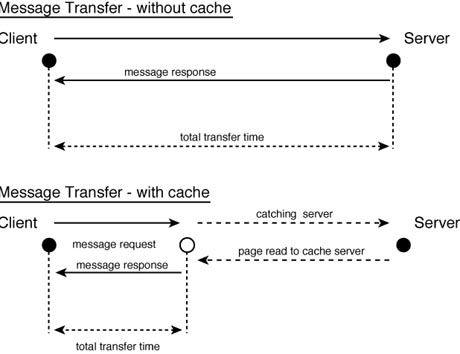
It is possible for any intermediary devices to act as a cache--the benefits being both a greatly reduced response time and the preservation of available bandwidth within the Internet. Figure 21.6 illustrates how this might occur. It outlines that the communication path between the Web server and client is effectively shortened with the use of a cache on an intermediate server. The intermediate server is able to return requested web pages to the client if those pages exist within its cache. In order to ensure that up-to-date information is returned, the client will send a conditional GET request.
Figure 21.6.
Improving HTTP performance through the use of a cache.
The conditional GET request is made through the use of message request headers available within version 1.0 of HTTP. Listing 21.3 provides an example of how such requests would be structured.
Listing 21.3. Making a conditional GET request.
workstation> telnet www.dttus.com 80
trying 207.134.34.23
Connected to 207.134.34.23
Escape character is [^
GET /pub/images/dttus/mapimage.gif                 request line entered
If-Modified-Since:Thursday,13-Feb-97 22:23:01 EST  conditional GET Header
                                                   request terminated by CR/LF
HTTP/1.0 304 Object Not Modified                   response starts with Status
                                                   Line which indicates that
                                                   the object was not
                                                   modified. (Single Blank
                                                   line ends server response
                                                   headers).

Connection closed by foreign host                  TCP connection is terminated.

workstation>
workstation>
Listing 21.3 indicates that the client formats a conditional GET request using the If-Modified-Since request header value. This request asks the Web server only to send the image if it has changed since the indicated date. The Web server returns a response status line indicating that the image has not changed. The server closes the TCP connection and the Web client displays the image from within its cache.
The use of caches and intermediary servers enable the HTTP application protocol to operate more efficiently. It should be noted that even with the use of a cache, a TCP connection between the server and the client would need to be established; however, the successful use of a cache greatly reduces the total required data transfer.
Looking to the Future
HTTP version 1.1 is classed as a minor upgrade of the existing application protocol implementation. RFC 1945 tells us that minor upgrades provide enhancements in key areas of functionality--without major changes in the operation of the underlying operation of the application. Two of the key areas of improvement HTTP 1.1 focus on providing the support of persistent TCP connections and more effective use of caching techniques.
More importantly, HTTP version 1.1 is being developed as a standard to be ratified by the Internet Engineering Task Force (IETF). Previous implementation of HTTP never underwent standards acceptance. This resulted in a proliferation of applications that called themselves HTTP/1.0 without implementing all the recommendations outlined within the published RFC. Given the diversity within existing implementations, a protocol version change was determined the most effective way to enable a basis for a standard solution.
In this section, we focus on some of the main recommended changes to the existing protocol implementations. Refer to the previous reference tables for HTTP/1.1 included message formats and return codes.
Supporting Persistent TCP Connections
The standard operation within HTTP version 1.1 is for the client to request a single TCP connection with the remote server and use this for all the required transfers within a sessions. This directly contrasts the existing requirement to setup a separate TCP connection for the transfer of any single object within a given HTTP session.
This single change has the potential to save both Web server resources and available network bandwidth. In addition, the use of a persistent connection will provide for greater operational efficiencies found within existing implementations of TCP.
New Request Methods Supported
In addition to the request methods supported within HTTP/1.0, version 1.1 has added the following new methods outlined in Table 21.8.
Table 21.8. HTTP version 1.1 Additionally Supported Request Methods.
| New Methods | Description |
| OPTIONS | This is a newly defined request method that provides the HTTP client with the capability to query a remote Web server as to its ability to its communication and protocol support. New message body information is passed using this method. |
| PUT | Enables a Web client to deliver a new object to a Web server. This object will be identified using a URL specified within the method. The PUT method differs from the HTTP/1.0 POST method (which is still supported). The POST request provides a URL reference to the object that will be used to interpret the supplied message; in contrast, the PUT method provides a URL as a reference it its message body contents. |
| DELETE | This is used to remove a specified object--referenced using an enclosed URL. |
| TRACE | This method provides an effective means for troubleshooting connections and/or performance. The TRACE method provides an application layer loop-back of messages--the final recipient of the message sending a 200 (OK) response back to the initiating client. This response will include header information that details the route the request and the response has taken. |
HTTP version 1.1 provides for support of a number of additional header values. These newly supported headers and their main functionality additions are summarized in Table 21.9.
Table 21.9. HTTP version 1.1 Additionally Supported Header Values.
| General Header | Most important addition within Version HTTP/1.1 is the support for persistent connections. The new header value "connection" allows a single TCP connection to be utilized for all data transfers between client and server. |
| Response Header | Several additional header values offer improved communication control between browser and server. Providing the server a capability to signal its features and available functions to the browser. In addition, some authentication controls are provided including challenge/response controls. |
| Request Header | The major addition to the request headers is the provision of an increased number of tests for a conditional download. These new tests allow a greater control over the download of Web server data. In addition, HTTP/1.1 request headers also allow browsers to flag to servers a list of acceptable data formats they are willing to receive. |
| Message Header | The most exciting addition is the inclusion of the "content-range" header. This allows for the partial transfer of data objects reflected only changes that might have occurred. This provides a far more efficient mechanism for providing data updates from Web servers. |
In addition, a number of new headers have been added that allow the server to relay more information about the actual content, such as content encoding type, language, and message size.
Summary
There is little doubt as to the importance of HTTP within the Internet. The application provides a simple solution for dynamically moving files between Web clients and servers--without the overhead or user intervention that is associated with the more standard file transfer programs, such as NFS and FTP.
HTTP has some major strengths, but also some significant weaknesses. A number of serious performance problems have been associated with HTTP's operation. At the head of this list would probably be the requirement of having to fire up a separate connection to transfer each page or data object--.
The use of server- and client-based file caches gets us part of the way to streamlining communications. However, we still require setup and tear down of TCP connections, which uses limited resources and slows down overall performance.
The answer is to make use of persistent connections. This would involve establishing a single TCP connection and maintaining it until all data transfer between the client and web server has been completed. In such a way it would be possible to take advantage of useful performance features found within TCP that would aid the download of multiple web pages. HTTP version 1.1 attempts to provide this functionality through the use of additional protocol header values.
Finally, existing vendor interoperability issues will effectively be over with the expected standardization of HTTP/1.1 in the later part of 1997. It is hoped that with HTTP/1.1 ratified as an Internet Standard it will be possible to improve the integration between different vendor solutions.



©Copyright,
Macmillan Computer Publishing. All rights reserved.